
Pixels are like tiny soldiers of color and light, marching across your screen with purpose. Each pixel, a minute beacon of illumination, holds the secrets to the digital canvas, carrying vital information about color, brightness, and sometimes even transparency. Together, these individual pixels form the backbone of the visuals that color our everyday lives, akin to the atoms that make up the digital universe. Think of pixels as comrades arranged in a precise grid-like formation, each staking its claim to a specific space on the screen.
Now, enter the world of GIFs, the messengers of animated delight, known formally as indexed images. Unlike their counterparts like PNG or JPEG, where each pixel directly represents a color, GIFs take a different approach. Instead of storing colors outright, GIFs utilize a palette of colors, assigning a unique index value to each pixel. Imagine a GIF depicting a radiant rainbow. Rather than storing the actual colors, the image employs a palette with eight distinct hues to capture the spectrum of the rainbow’s brilliance. But here’s where the real magic unfolds: rather than jotting down colors, the image cleverly uses a string of binary code—0s and 1s—to denote which color from the palette each pixel embraces. This process is called color indexing. It’s like a secret code, with each pixel proudly displaying its assigned value based on its spot in the palette.
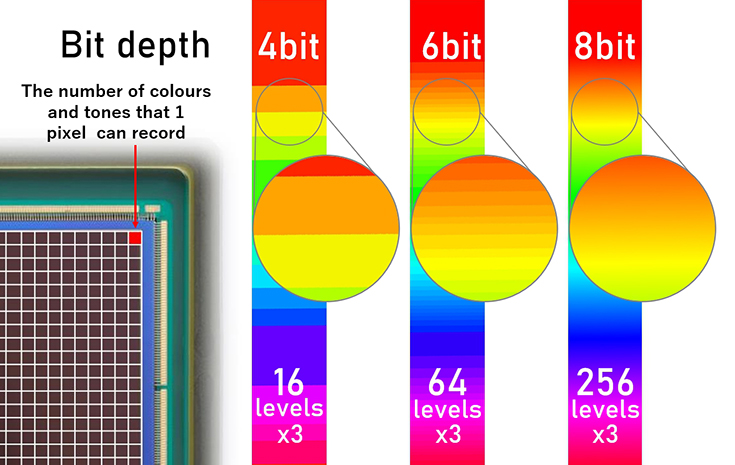
Now, let’s talk about bit depth—the maestro orchestrating the symphony of colors in an indexed image. A bit depth refers to the number of bits used to represent the color of each pixel in a digital image. It determines the range of colors that can be displayed, also known as the color depth or color palette. Imagine bit depth as the paint palette for a digital image. Just like a painter needs different colors to create a masterpiece, digital images rely on a range of colors to look their best. Now, think of bit depth as the size of that paint palette. The higher the bit depth, the bigger the palette, and the more colors you have to work with. For example, imagine starting with a small palette that only has two colors: black and white. That’s like a 1-bit image. With just one bit, you can only choose between black (represented by 1) or white (represented by 0). It’s like working with a pencil that only has two shades – not much room for detail! But as you increase the bit depth, the palette expands, giving you more options. When you have two bits, each bit can choose from either 0 or 1. For two bits you would have either 00, 01, 10, or 11. Each combination represents a unique color in the context of color representation. An 8-bit image is like having a palette with 256 colors to choose from. Suddenly, you can paint with shades of red, blue, green, and everything in between! And if you go even further to a 24-bit image, it’s like having a palette with over 16 million colors! Now you have an endless array of hues to create stunning visuals. But here’s the trade-off: the more colors you have, the bigger the file size of the image. That’s because each pixel needs to store more information about its color. It’s like having a bigger canvas to paint on – it takes up more space, but it allows for more intricate details and richer colors. So, in simple terms, bit depth is like the paint palette of a digital image. The higher the bit depth, the more colors you have to play with, but it also means a larger file size to accommodate all that color information.
Sources: Proofread by ChatGPT
Prompts:
“Tell me about pixels and bit depth”
“Make it more human”
“Give me a catchy title”